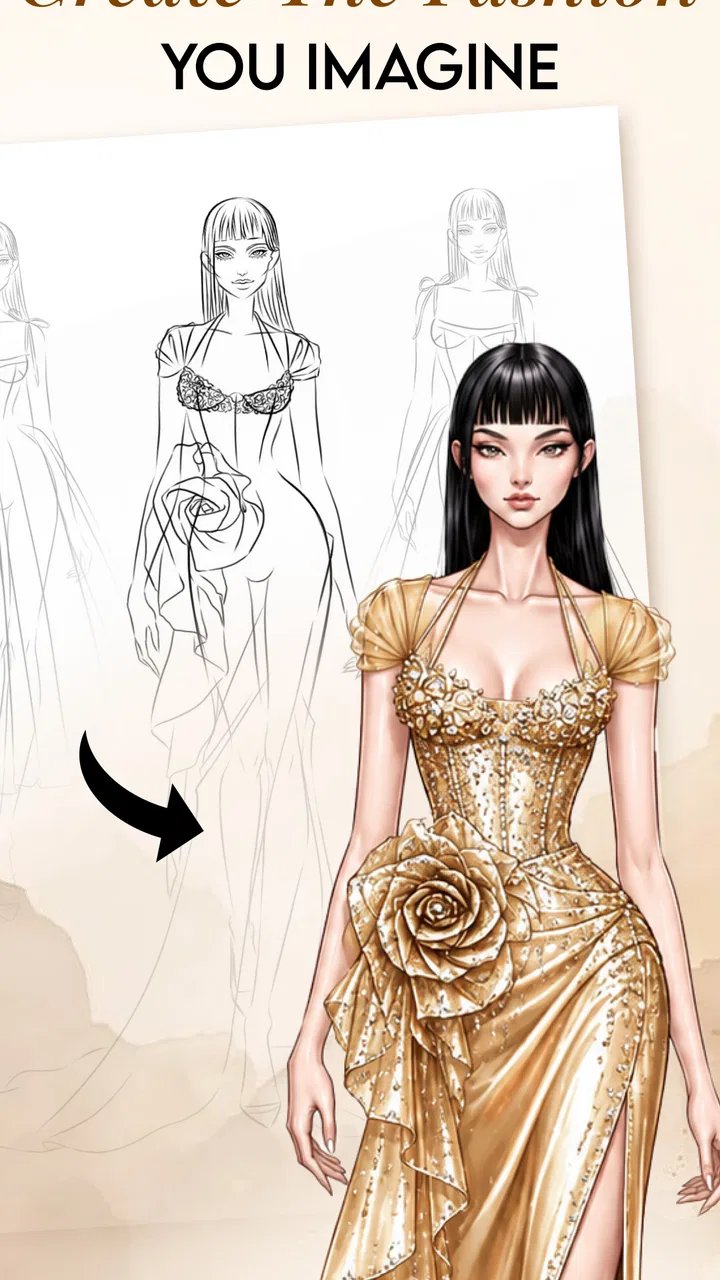
Fashion Design Clothes: Sketch
- 4.6
- Rating
- 1.00M
- Installs
- Free
- Price

 Analysis by App-foxy
I approached Fashion Design Clothes: Sketch as a practical drawing companion rather than a complete fashion-production suite. It is an Art & Design app from Smartmove Global, built around the idea of turning clothing concepts into visual sketches with help from AI. That makes it interesting for anyone who wants to move quickly from a vague outfit idea to something visible on screen, especially when a notebook feels too slow or a full illustration program feels intimidating.
My overall impression is that its appeal depends less on replacing professional design software and more on reducing the distance between inspiration and a first draft. You can use it when an outfit suddenly comes to mind, when you want to explore several silhouettes before choosing one, or when you need a simple visual reference for a personal project. The free entry point is helpful, although optional purchases ranging from $1.99 to $19.99 per item mean that regular users should pay attention to which parts of the experience are included and which are reserved for payment.
How it feels during everyday fashion sketching
I find this app easiest to judge in brief, practical sessions: capturing an outfit idea, comparing a couple of silhouettes, or deciding which detail deserves more attention. That everyday rhythm also makes it worth considering what you want to preserve and how much creative control you need before choosing a tool. From there, I’ll look at the trust questions that matter when a sketching app becomes part of a personal workflow.
You May Also Like

 Blood Strike: 2.5 Anniversary
Blood Strike’s Loadouts Turn Every Drop Into a Tactical Gamble
A close look at Blood Strike’s custom loadouts: how fast access to signature weapons reshapes its battle royale rhythm, rewards preparation, and narrows the gap between fights.

 Pandora - Music & Podcasts
Pandora’s Music Is Easy to Start, but Harder to Recover
Pandora’s strength is its low-effort path from a seed to a station. Its weak spot is how much confidence it asks you to place in connection, setup, and quiet recovery.

 8 Ball Pool
 Is Built on Rivalries, Rematches, and Routine
A close look at the rivalries, rematches, shared routines, and unanswered safety questions that turn a quick pool match into a persistent mobile community.

 Samsung Music
’s Quiet Strength Is Playing What You Already Own
Its reach comes less from spectacle than from dependable access to a personal library. That simplicity is both the app’s strongest retention engine and its ceiling.

 AccuWeather: Weather Radar
AccuWeather Review: A Quick, Clear Forecast for Everyday Decisions
For everyday plans, the best forecast is the one you can understand quickly. AccuWeather makes rain timing, radar, and local conditions easy to act on, with a few trade-offs.

 Hill Climb Racing
Why Hill Climb Racing Still Turns Crashes Into One More Run
A tiny car, a bumpy hill and one more upgrade: Hill Climb Racing keeps resurfacing because its simple chaos makes every near-miss feel personal.
More From Our News Desk



Quick ideas are where the app makes the most sense
The strongest use case is a short creative session. I can imagine opening it while commuting, waiting for an appointment, or browsing fabric ideas at home, then putting together a rough outfit concept before the thought disappears. A dedicated fashion sketchbook is more focused than a general notes app because the subject is already narrowed to clothing and styling. That focus matters when the goal is not to write a description such as “oversized jacket with a narrow skirt,” but to see the proportions and relationship between pieces.
The app’s AI-oriented approach also changes the starting point. Instead of requiring a confident drawing hand, it gives beginners a way to experiment with fashion concepts visually. I would not treat the first result as a finished design, but it can act as a useful prompt. The important creative step is often comparison: a cropped jacket against a long coat, a straight silhouette against a loose one, or a restrained palette against a more dramatic combination. Fast visual exploration can reveal which idea deserves more careful work.
That speed is valuable, but it should not be confused with instant professional output. A generated or assisted sketch still needs human judgment. Details such as how fabric hangs, where seams should sit, whether a sleeve is practical, and how a garment would behave on a real body are not solved simply because an image looks attractive. I found the app more convincing as an ideation tool than as the final authority on construction.
A useful workflow for turning inspiration into a clearer concept
I would use it in three passes. First, I would make a deliberately rough concept instead of trying to perfect the first attempt. The purpose is to decide the overall shape. Second, I would create alternatives that change only one major element, such as the length, neckline, or outer layer. This makes the comparison meaningful rather than producing a collection of unrelated images. Third, I would keep the strongest direction and annotate it elsewhere with practical notes about materials, measurements, closures, and construction.
This workflow avoids a common trap with AI-assisted creative apps: accepting the first attractive result as the finished idea. Fashion design benefits from iteration, and the app is most useful when it helps me ask better questions. Does the silhouette match the mood I intended? Is the outfit balanced from top to bottom? Would the design still work if the decorative detail were removed? Those questions turn a quick sketch into a design decision.
Another practical tip is to begin with a narrow brief. Rather than asking for a broad “fashion look,” I would define the occasion, season, dominant shape, and one standout detail. A focused brief makes it easier to judge the result and reduces the temptation to chase random variations. This is especially helpful on a phone, where a long creative session can become tiring and small changes are harder to track.
Where it sits beside familiar alternatives
Compared with a paper sketchbook, the app is easier for rapid variation and less forgiving when you want complete control over every line. Paper remains better for freehand gestures, fabric studies, and personal marks that develop naturally without an interface. A pencil also has no learning curve involving prompts or digital controls, and it never asks me to decide whether a particular creative option requires an in-app purchase.
Compared with a general drawing app, this one has a clearer fashion identity. A broad illustration tool may provide more control over brushes, layers, tracing, and detailed editing, but it also expects the user to build the fashion workflow from scratch. Someone who already knows digital illustration may therefore prefer a conventional drawing app for final rendering. Someone who mainly wants to explore clothing ideas may appreciate having a more direct starting point.
It also differs from a professional computer-based fashion platform. Those tools are better suited to technical flats, pattern development, garment specifications, repeatable measurements, and production communication. I would not choose this app as the only tool for a designer preparing manufacturing documents. Its value is earlier in the process, when the question is “what could this look like?” rather than “how do I produce this garment accurately?”
What happens during longer or heavier creative sessions
Short sessions are the natural fit, while heavier use deserves a more measured expectation. Repeatedly generating alternatives, working with more elaborate concepts, or keeping many visual references in mind can make any mobile creative workflow feel less comfortable than a larger screen. The app is available for devices running Android 7.0 or later, which gives it a broad compatibility range, but compatibility alone does not make every older phone equally pleasant for sustained visual work.
On a modest device, I would keep the process organized and avoid treating the app like a full desktop studio. Work in small batches, save or record the direction of a promising idea, and close unrelated apps before a long session. These are sensible habits for any image-focused tool, especially when the phone has limited memory or storage. I would also avoid judging the app solely on the first few seconds after opening it; creative tools often feel fastest when the task is simple and the working set is small.
The resource trade-off is straightforward: visual experimentation is more demanding than writing a text note, and AI-assisted work can involve more processing than a basic sketch. I would therefore expect the smoothest experience on a reasonably modern phone, without claiming that every device will behave identically. If your handset already struggles with image-heavy applications, a paper pad or lightweight drawing app may be the more comfortable choice for extended sessions.
Stability, interruptions, and recovering a good idea
Reliability matters more in a creative app than many people expect. Losing a rough concept is frustrating because the value may be in a small visual relationship that is difficult to recreate. My advice is to treat promising work as something worth preserving as soon as it reaches a useful stage. Do not wait until the end of a long exploration to make a note of the chosen silhouette or the key styling direction.
A simple recovery habit is to keep a short written record beside the visual result: the intended occasion, the main garment, the proportion that worked, and the detail that should change next. If an interruption occurs, that note gives me a way back into the idea instead of forcing me to remember an entire sequence of experiments. It also makes the app more useful as part of a broader workflow rather than as a sealed creative world.
I would be cautious about relying on a single mobile app for irreplaceable design work. For casual concepts, losing a draft is merely annoying. For a portfolio direction, a client discussion, or a personal collection, I would preserve important outcomes outside the app as part of normal digital housekeeping. This is not a criticism unique to this product; it is a sensible boundary whenever a creative tool is being used for work that matters.
Device requirements and the cost of convenience
The minimum Android requirement is 7.0, so people with older devices should check compatibility before planning around it. On a supported phone, the main question is less whether the app can install and more whether the screen, storage, and general responsiveness are suitable for visual work. A small display can make outfit proportions harder to judge, while a phone with limited free space may make image-based projects inconvenient to manage.
The app is free to start, which lowers the barrier for curious beginners. Its Teen content rating also places it in a category that is more appropriate for older children and adults than for very young users. I would still encourage parents to look at the app together with a teenager, particularly because creative AI tools can produce ideas that need context and because purchases are available inside the app.
The optional items cost from $1.99 to $19.99 each. That range is important for anyone who plans to use the app frequently. A casual user can try the basic experience without committing immediately, but a serious hobbyist should decide in advance how much the convenience is worth. I prefer to evaluate a purchase by asking whether it improves a specific workflow—such as faster iteration or access to a needed creative option—rather than buying simply because the result looks appealing in a single session.
Who will enjoy it, and who should choose something else
This is a good match for beginners who want to explore clothing ideas without first learning a complex illustration program. It can also suit fashion students during the brainstorming stage, casual stylists planning outfits, and creative people who like collecting visual directions on a phone. The app’s focus makes it easier to stay on the subject of garments instead of getting distracted by the endless tools found in a general-purpose art package.
I would be more hesitant to recommend it as the main tool for an experienced illustrator who needs precise brush control, advanced layer management, or exact technical drawings. I would also steer away from it for anyone expecting reliable pattern-making instructions or production-ready specifications. In those situations, a specialist fashion design platform or a desktop drawing environment is the better investment, even if it takes longer to learn.
It may also be a poor fit for someone who dislikes experimentation with AI-assisted results. The app’s attraction comes from helping generate or shape possibilities, so users who want every mark to originate from their own hand may feel more comfortable with paper or a traditional digital sketching tool. That preference is completely reasonable; the right choice depends on whether speed and exploration matter more than direct, manual control.
What the current release and community signals suggest
The current version is 1.4.2, and the app has passed the early trial stage with more than one hundred thousand installs. It carries a 4.7 average from around nine hundred ratings, which suggests that the people who have rated it tend to respond positively. I treat that as encouraging rather than conclusive: ratings can show broad satisfaction, but they cannot tell me whether the app fits a particular drawing style, phone, or level of fashion experience.
The small number of written reviews displayed alongside the rating makes the numerical impression less informative than a hands-on test. I would use the free entry point to answer practical questions before spending money: Is the visual approach close to what I want? Do I enjoy the interaction? Does it help me make decisions, or do I spend more time correcting results than developing ideas? Those answers matter more than a single average score.
My performance verdict
In performance terms, I see Fashion Design Clothes: Sketch as a focused mobile sketchbook for quick visual exploration, not as a replacement for a full fashion workstation. Its perceived speed should be best when I keep concepts focused and work in short, organized rounds. Its heavier moments are likely to come from repeated visual experimentation and the limitations of a small device, so expectations should match the phone being used.
The app’s greatest strength is the way it lowers the starting barrier. I can begin with an outfit idea rather than a blank technical canvas, compare directions, and use the result to guide more careful work elsewhere. The main friction comes from the gap between an attractive concept and a truly resolved garment, along with the need to think carefully about optional purchases and preserving important results.
For me, the recommendation is clear but specific: try it if you want a convenient way to brainstorm clothing and fashion illustrations on Android, particularly if you are new to digital design. Keep a traditional sketchbook or a more advanced drawing program nearby when control, precision, or production detail becomes important. With that division of labor, this free Art & Design app from Smartmove Global becomes a useful first step rather than an overpromised final solution.
FAQs for Fashion Design Clothes: Sketch
01What is Fashion Design Clothes: Sketch?
Fashion Design Clothes: Sketch is a creative app designed for aspiring fashion designers and enthusiasts. It allows users to sketch and create clothing designs using a wide range of tools and templates. The app provides features like layers, color palettes, and fabric textures to bring your fashion ideas to life.
02Is Fashion Design Clothes: Sketch suitable for beginners?
Yes, Fashion Design Clothes: Sketch is user-friendly and suitable for beginners. The app offers tutorials and guides to help users get started with designing. It also includes easy-to-use tools and a simple interface that allows newcomers to explore and express their fashion creativity effectively.
03What features does Fashion Design Clothes: Sketch offer?
The app offers a variety of features such as customizable templates, a wide color palette, layering options, and realistic fabric textures. Users can also access a library of fashion elements like buttons and zippers. Additionally, the app supports exporting designs for sharing or printing, making it versatile for professional use.
04Can I use Fashion Design Clothes: Sketch on both Android and iOS?
Yes, Fashion Design Clothes: Sketch is available for both Android and iOS platforms. Users can download it from the Google Play Store or the Apple App Store. The app ensures a seamless experience across devices, allowing designers to work on their projects anytime, anywhere.
05Is there a cost to use Fashion Design Clothes: Sketch?
Fashion Design Clothes: Sketch offers a free version with basic features. However, to access premium tools and templates, users may need to purchase a subscription or one-time feature packs. It's advisable to review the pricing details on the app store to understand the costs involved.
Pros
- Intuitive interface for easy sketching.
- Wide range of design tools available.
- Supports export in multiple formats.
- Frequent updates with new features.
- Customizable color palettes.
Cons
- Limited accessory options.
- Ads can be intrusive at times.
- No offline mode available.
- High learning curve for beginners.
- Requires in-app purchases for advanced tools.

Fashion Design Clothes: Sketch
Gallery